VAT
If you're registered for VAT, Press adds up the VAT on what you've sold and what you've bought, shows what you owe for each period and when it's due, and lists anything to sort before you file.
Data › VAT
Every plan · the figures and returns need Pro
Beta
STOPYour tax is your responsibility
Press helps you gather these VAT figures, but it doesn't apply the rules for you. Checking them is your responsibility, so if you're not sure, ask a registered accountant.
Turn on the VAT pages
- Go to Settings › Tax and VAT.
- Turn on Work out VAT (beta).
- Fill in when you registered, how often you file and your usual rate.
With the switch off, nothing that works VAT out is shown. Your records still keep their VAT rate either way, on every plan.
If it doesn't work
No switch? The VAT pages are for a business in Ireland. Check the country on your business profile in Settings.
See what you owe
ProNeeds Press Pro.
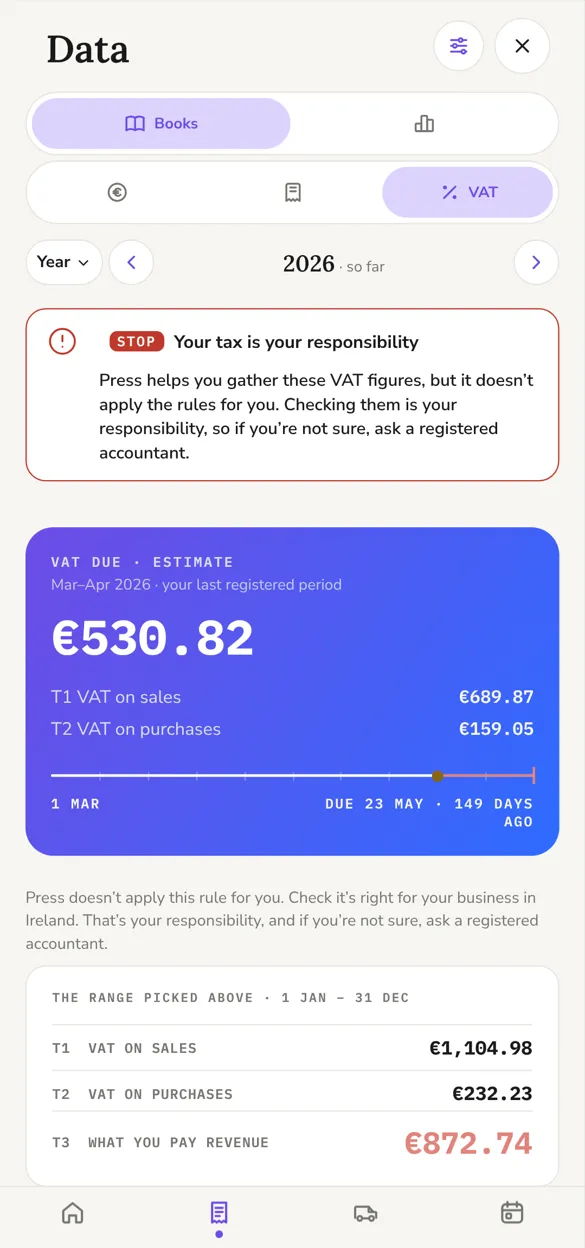
Open Data › VAT. The card at the top shows the VAT due for this period, marked as an estimate, and the day it's due.
Under it are the figures for the return: T1 is the VAT on your sales and T2 is the VAT on what you bought. Pick another range to see T1, T2 and T3 for it.
You file and pay through ROS yourself. Press doesn't send anything to Revenue.
Watch the registration threshold
Not registered yet? Press keeps a running total of your turnover against the VAT registration threshold and tells you as you get near it. This works on every plan.
Your returns
ProNeeds Press Pro.
Data › VAT returns lists each period: sent, due, or nothing recorded, and how late if it's past its date. Once you've sent a return on ROS, tap Mark as filed. Filed periods move under Filed, and older ones under Earlier periods.
If it doesn't work
Changed a record in a period you've already filed? Press tells you which period moved, so you can check it with your accountant.
Before you file
ProNeeds Press Pro.
Each return opens with a Before you file list. It shows receipts that can't back a VAT claim, receipts you haven't checked yet and, if you're on the cash basis, VAT on invoices that haven't been paid. Sort what's there, then file.
Return of Trading Details
Once a year Revenue asks for a summary of your sales and purchases, with nothing to pay. Press shows when it's due and gives you the figures for it. This works on every plan.
A summary for your accountant
ProNeeds Press Pro.
You can save each period as a PDF with its figures, to send to your accountant or keep with your records.
Does Press file my VAT return?
No. Press works out the figures and you file through ROS yourself.
Why does it say beta?
The VAT pages are still being tested and an accountant hasn't checked every rule yet. Check the figures before you rely on them.
I'm outside Ireland. Can I record VAT?
Yes. Turn on VAT registered on your business profile in Settings and set your rate. Each record keeps its VAT, but Press doesn't work out returns outside Ireland.