Adding money in and out
Money in is a payment you've had. Money out is something you've spent on the business. Both go into your books the moment you save them, and both use the same kind of form.
Records › + › Income or Expense
Every plan · reading a receipt needs Pro
Add money in
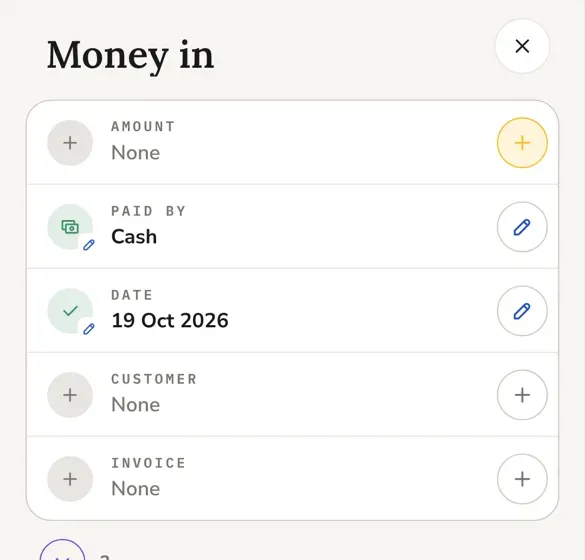
- On any Records page, tap the round + and choose Income.
- Type the amount. Check how they paid and the date; both are filled in for you.
- Pick the customer, and the invoice it pays if there is one.
- Tap Save.
A row the form still needs has a gold +, and Save stays grey until it's filled. The violet ring under the card holds the rows you don't always need, with a count of how many.
If it doesn't work
Save still grey? Look for a gold +. It marks the row that's missing.
Match a payment to invoices
Pick a customer and their open invoices appear under the amount as ticks, oldest first. Tick the ones this payment covers. The line underneath says what's settled, what's still owed and what's held over.
Tick one invoice before you type an amount and Press fills in what that invoice still owes. An amount you've already typed is left alone.
One payment for two customers, like a landlord paying for two houses? Add the other customer's invoice to the same payment and each part goes to the right customer.
Add money out
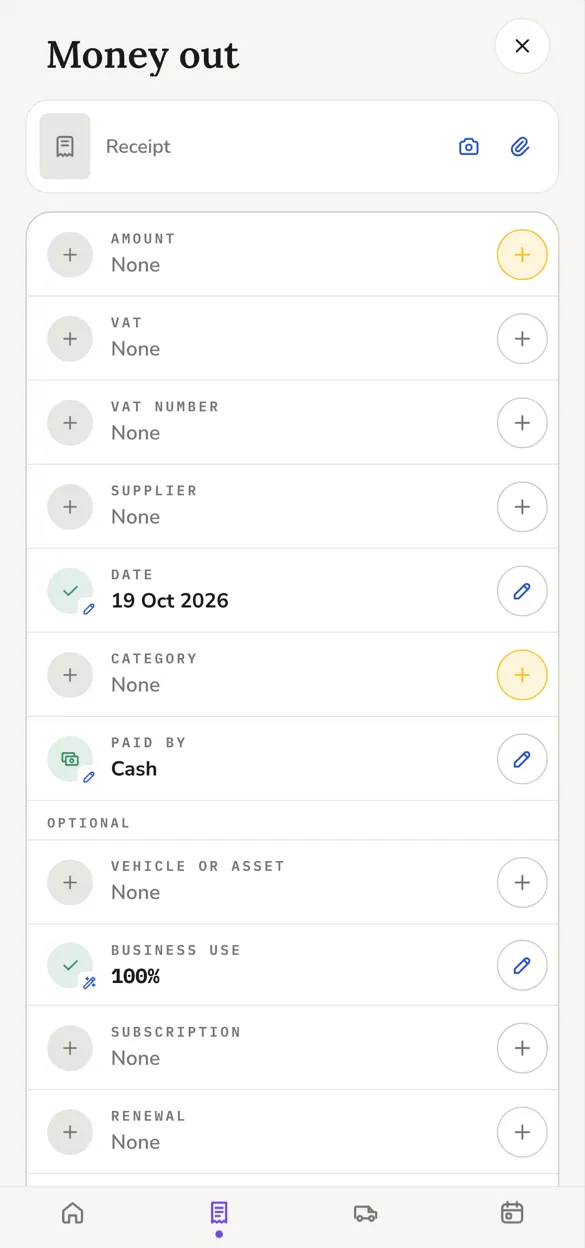
- Tap the round + and choose Expense.
- Add the receipt if you have it: the camera takes a photo, the paperclip picks a file.
- Fill in the amount, the VAT, the supplier, the date and the category. Your most used categories and suppliers are there to tap.
- Tap Save.
Under Optional you can tie the expense to a van or other asset, a subscription, or a renewal it paid for, like van insurance paid monthly.
A fuel expense also takes the litres and which fuel, and goes to your default vehicle.
Read a receipt from a photo
ProNeeds Press Pro. On Foundation you can still attach the photo and type the figures yourself.
Take a photo of the receipt and Press reads it on your phone, then opens the form with what it found. Every line on the receipt starts ticked as business. Untick anything personal and it comes off the amount.
A receipt in another currency is changed at that day's rate, with the original kept beside it. It's marked as an estimate until you check it against your statement.
If it doesn't work
Figures look wrong? Check them against the receipt before you save. Press reads the photo; it can misread a crumpled or faded one, and what you save is what goes in your books.
Part business, part personal
Some costs are only partly for the business, like a phone you also use at home. Set Business use under Optional to the share that's for work, and only that share counts.
Get through a pile of receipts
Tap And another instead of Save. The expense is saved and a fresh form opens with the same date, ready for the next one.
Take cash to the bank
- Tap the round + and choose Cash lodged.
- The cash payments you still have are listed, oldest first. Type what you lodged and Press ticks the oldest that make it up.
- Pick the account and the date, and save.
Lodging isn't income, so it moves none of your figures. The ticked cash just leaves Cash in hand.
Can I change a payment after saving it?
Yes. Open it and change the customer or the invoice. It can only move to an invoice that still owes at least the payment, and both invoices work out what's paid again.
Is the VAT rate on every record, even without the VAT pages?
Yes. Every expense and payment keeps its VAT rate on every plan, whether or not you use the VAT pages.