Invoices
An invoice tells a customer what they owe you and how to pay. Press keeps every invoice you send, shows what is still owed, and marks it paid when the money comes in.
Records › Invoices
Every plan · two parts need Pro
See what you're owed
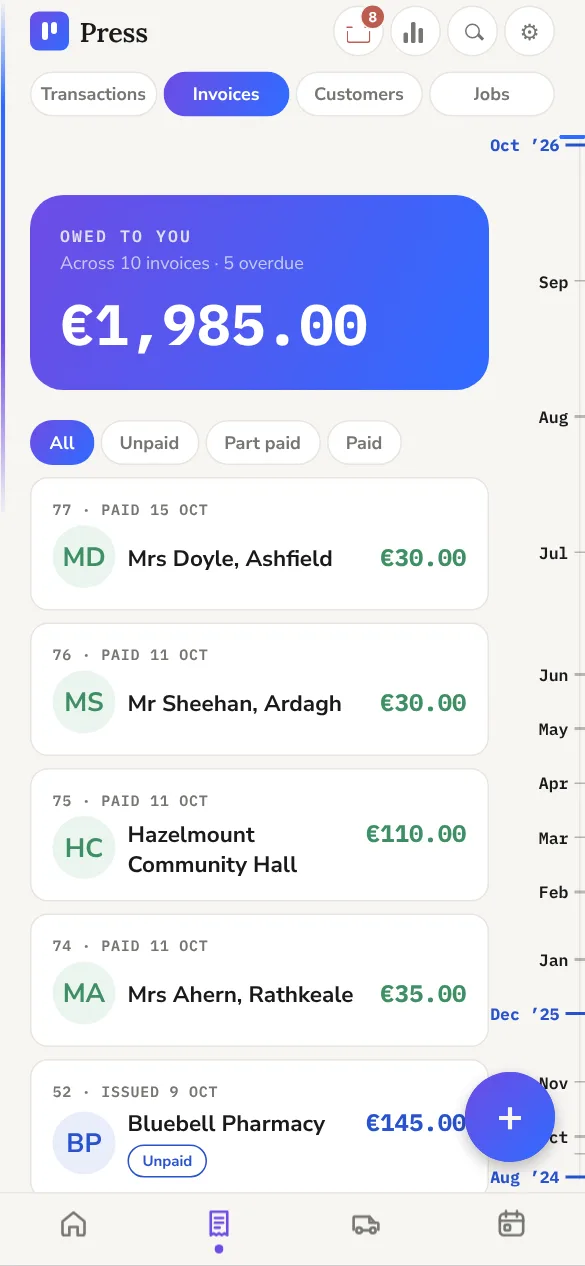
#Open Records › Invoices. Owed to you at the top is the total still unpaid. Under it are three figures for the invoices listed: Invoiced, Paid and Owed.
Each invoice wears its state:
An invoice that is part paid shows what is still owing, with the full amount beside it, for example €45.00 of €90.00.
Make an invoice
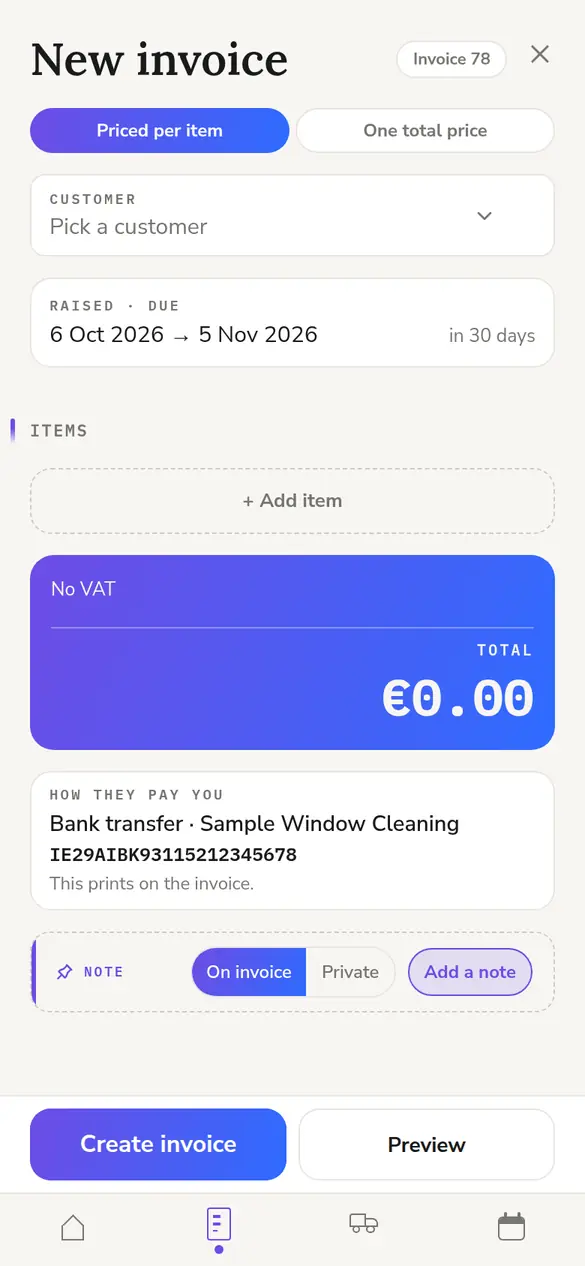
#- Tap + and choose Invoice. Or open a customer and tap New invoice, which fills in their details for you.
- Pick the customer and the address. Press offers the customer's own address, the address of each of their jobs, or a new one.
- Check the date and the due date. The due date is 30 days later unless you change it.
- Add the lines. Type each one, or pick from your saved items.
- Add a note if you want one, then tap Save.
If it doesn't work
If Press says you have no way to pay set up, add one in Settings › Your business › Payment methods and save the invoice again. Without one, the customer's copy has nothing under How to pay.
Mark an invoice paid
#Open the invoice, then:
- Paid the lot: tap Mark as paid in full.
- Paid some of it: tap Payment, type the amount and the date, and tap Save. The invoice then shows what has been paid and what is left.
Got an amount wrong? Change the payment and Press works out the balance again.
If it doesn't work
An invoice brought in from another app can say Paid while your income hasn't moved. It was marked paid with no payment recorded. Tap Payment on it to add the money to your income.
Needs Press Pro. On Foundation the button isn't shown, but a payment for a link you already sent still comes through.
- Connect Stripe once, in Settings › Your business › Payment methods.
- On an unpaid invoice, tap Pay link. Press sends a link for exactly what is owed.
- When the customer pays by card, the invoice is marked paid by itself and Stripe's fee goes into your expenses.
If it doesn't work
The customer says they paid and the invoice still shows Owed? Look in the Inbox. A payment Press couldn't match waits there for you to choose the invoice. Refunds, disputes and links still unused after the due date show there too.
Needs Press Pro.
On an unpaid invoice, tap Remind. The message is filled in with the invoice number, what is still owed and the PDF. It goes the way you usually send messages and shows in that customer's chat.
Press can also remind people for you 3, 7 and 14 days after an invoice is due. Each reminder waits in the Inbox for you to send with one tap, or goes by itself if you choose. A customer gets no more than one a day, and reminders stop once the invoice is paid. Turn them off for one customer or one invoice, or set them up in Settings › Messages › Payment reminders.
The invoice your customer gets
#Tap Invoice on the invoice page to open the PDF your customer gets. It carries your logo and colours, your business details, where the work was done, and the details Revenue asks for on an invoice.
How to pay is one list in your order: a Stripe link first if you use one, then each bank with its name, IBAN and BIC on lines of their own. Ways with nothing to print, like cash, are named together in one line at the end.
Not registered for VAT? The invoice says no VAT is charged and that your business isn't registered.
Saved items, numbers and VAT
#- Save work you invoice often in Settings › Services. An item can have a fixed price, a price you type each time, or one total with several items listed under it.
- Press numbers your invoices for you. Use your own format, with a reference for each customer, in Settings › Your business › Invoice numbering.
- Each customer is a consumer or a business. A householder's price includes VAT; a business's has VAT added on top. Change it on the customer's page.
Archive or delete an invoice
#- Archive a paid invoice to take it off your lists. It still counts in every figure. The Archived chip shows them, and one tap brings one back.
- To delete, open the invoice, tap ⋯ and choose Delete invoice. Press asks whether the payment against it goes too.
Can I open the customer from an invoice?
Yes. Tap Customer on the invoice page. An invoice with no customer doesn't have the button.
Does an archived invoice still count?
Yes. Archiving only takes it off your lists. Every figure, including VAT, still includes it.
When does an invoice turn Late?
The day after its due date, if it isn't fully paid. The invoice shows how many days late it is.